How to build an encrypted secrets vault for agents
Your coding agent needs your API keys but should never see them. Here's how a single encrypted Turso database makes a local secrets vault almost trivial to build.

Your coding agent is good at a lot of things. Knowing what to do with your production Stripe key is not one of them.
Sooner or later a task needs a real credential. Call the GitHub API as you, hit your billing provider, deploy something. The agent asks for the token, and the path of least resistance is to paste it into the chat. Now your secret is in the model's context, in the transcript, in your provider's logs, in your ex's daily journal, and possibly in next quarter's training set. You did all of that just to let it run one curl.
In this tutorial we will learn how to give a coding agent access to your secrets without ever letting it see them: keep them in a local database, encrypted at rest, that the agent reaches only through a narrow, audited interface. The fun part is how little of it you actually build yourself, because Turso does the hard parts. To keep it concrete, I used exactly this technique to build a real, working tool, keymaxxer, an encrypted secrets vault for coding agents. In this tutorial I will walk you through keymaxxer's architecture and implementation, and empower you to build your own secret managers tailored to your needs.
#The problem: use a secret without seeing it
There are two things people reach for. Both with drawbacks.
The first is to just hand the agent the secret: paste it in chat, or put it in the environment the agent itself runs in. Now the value is in the model's context. It's in the transcript, in your LLM provider's logs, possibly in a future training set, and the model can repeat it back in its own output whenever it likes. You can't un-send it, and you've spread a long-lived credential across systems you don't control, all to run one command.
The second is to push the problem onto a SaaS secrets manager. That works, but now your production credentials live on someone else's servers, and you've added a network round-trip to every shell command the agent runs. For a tool meant to run locally next to your code, that's backwards.
What you actually want is boring: a store on your own machine, encrypted at rest, that hands a secret to a child process and never to the model. The agent says "run gh api /user with GITHUB_TOKEN", the value gets injected as an environment variable into that one subprocess, the command runs, and the output is scrubbed of the value before the agent sees it. This isn't a sandbox, and it can't be: a command that can use a secret can always leak it on purpose. What it buys you is narrower and more useful: the model never sees the value (and a careless echo $TOKEN gets scrubbed), so the secret only ever lives in an encrypted file and the short-lived process that used it.
#The shape of the solution
keymaxxer is one encrypted database file per user (the vault), plus a thin layer around it.
- The encryption key is derived from a passphrase with scrypt and never written down. Lose the file and it's noise; the key is re-derived only when you unlock.
- The agent talks to keymaxxer over MCP. It gets two interesting tools:
keymaxxer_list, which returns secret names and attributes but never values, andkeymaxxer_run, which runs a shell command with named secrets injected as environment variables. keymaxxer_rundoes the work in a child process, then scrubs every occurrence of a secret value out of stdout/stderr before returning. Read-write or production secrets pop a native approval dialog first.
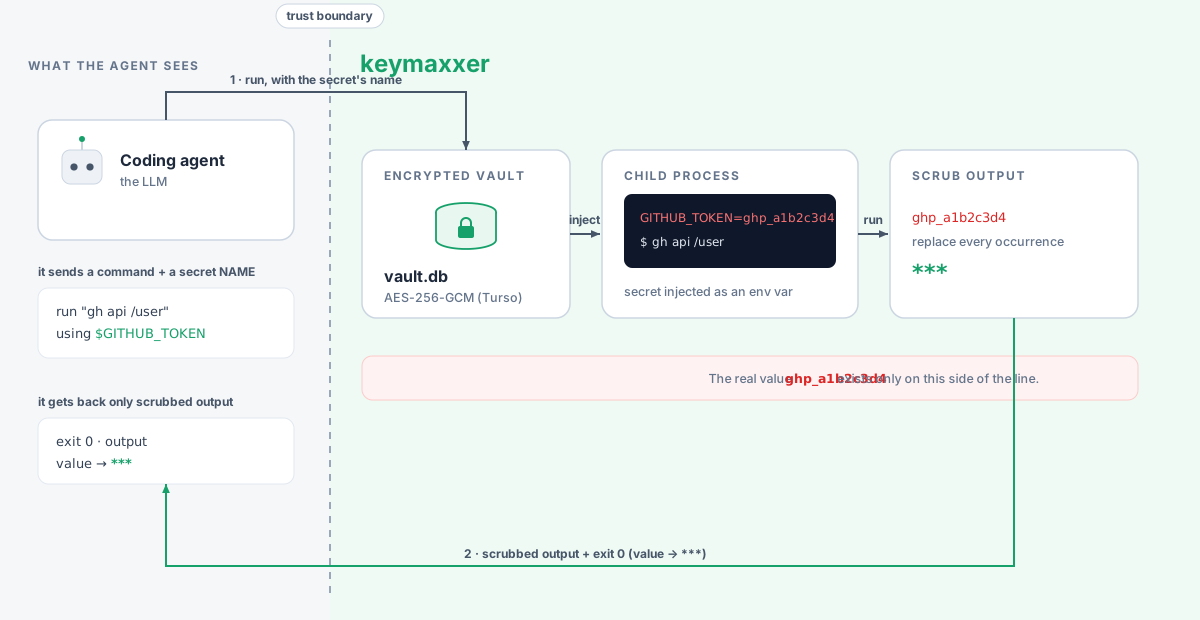
Notice what every one of those operations is, underneath: a read or a write against a local, encrypted database. Storing a secret is an INSERT. Listing names is a SELECT that never touches the value column. The audit log is an append-only table. None of that is novel; it's the sort of thing SQLite has done well for twenty years. The two parts that are not trivial, keeping the file encrypted at rest and letting several processes share it safely, are exactly what Turso hands you for free.
#The Turso part
Turso is a from-scratch rewrite of SQLite in Rust. It keeps SQLite's shape (a single file, in-process, no server) and adds the primitives local apps actually need. For keymaxxer, two of them carry the whole design.
#Native encryption at rest
SQLite, famously, has no built-in encryption. The official option is commercial; the popular one is a separate fork you have to build and link. Either way you're bolting crypto onto your storage layer and hoping you got it right.
Turso has whole-database encryption built in. You pass a key at connect time and you're done:
import { connect } from "@tursodatabase/database";

const db = await connect("vault.db", {
  encryption: { cipher: "aes256gcm", hexkey },
});
That is the entire integration. Every page of the file is encrypted with AES-256-GCM (or one of the AEGIS ciphers, which are faster). The file doesn't even begin with the usual SQLite format 3 header. Copy vault.db to another machine and it's an opaque blob, useless without the key. keymaxxer never touches a cipher, never manages page encryption, never writes a single line of its own crypto. It derives a key from your passphrase and hands it to Turso.
This one feature is what makes a local secrets vault reasonable. Your secrets stay on your laptop, and "at rest" actually means encrypted, not "a SQLite file anyone can run strings on."
#Many processes, one encrypted file
Here is where it got interesting. keymaxxer holds the key per session: every coding-agent session is its own process that unlocks the vault and keeps the key in its own memory. So several processes, a couple of agent sessions plus you poking at the CLI, all want to open the same encrypted file at the same time.
SQLite can do concurrent access, but you have to opt into the right WAL behavior across processes. Turso exposes it as a flag:
const db = await connect("vault.db", {
  // the key, in all its encrypted glory
  encryption: { cipher: "aes256gcm", hexkey },
  // allows access from multiple processes. Disable it for even stricter access
  experimental: ["multiprocess_wal"],
});
With that one flag, every process opens the same encrypted vault directly and nobody corrupts anyone else's writes. That is the difference between two architectures. The usual way to let many clients share one store is to put a long-running server in front of it: one process owns the file, and everyone else talks to it over a socket. It works, but now you own a daemon, with its socket, its lifecycle, and its bugs. multiprocess_wal lets you delete the daemon. The database is the coordination point, so each consumer (an agent session, a CLI command, a one-off script) is just a plain process that opens the file when it needs it and closes it when it's done. The shared state lives in the file, not in a server you have to keep alive.
#It's still just SQL
Everything else is unremarkable, which is the point. The vault is a normal table:
CREATE TABLE secrets (
  name        TEXT PRIMARY KEY,
  value       TEXT NOT NULL,
  provider    TEXT,
  environment TEXT,
  access      TEXT
);
Listing secrets for the agent is a SELECT that simply never asks for value. The audit trail is an INSERT per use. There is no special "secrets engine"; it's SQLite semantics you already know, with Turso quietly handling encryption underneath and multiprocess access around it.
SQLite always had the right shape for something you keep on one machine: a file you can copy, back up, and reason about. Turso keeps that and adds the two things a local vault needs, so the interesting code in keymaxxer is about agents and approvals, not about storage.
#Where this goes
What I described is the smallest version that's actually useful: one table, one key, scrubbed output. It's worth showing because everything past it is mostly more schema and more queries, not a rewrite. Your secrets live in a real database now, not in a pile of .env files, and a few directions fall out of that almost for free.
There are many ways to improve this for your own needs and make this stronger:
Tie a secret to where it's allowed to run. In its current incarnation, any command holding a secret can leak it. While the example implementation scrubs it from stdio/stderr, a malicious binary can still write it to a file, send it over the network, etc. You can improve this with per-secret policy: a GITHUB_TOKEN that may only be injected into a trust gh binary, or only for calls to api.github.com. That's a couple more columns on the secrets table and one check before you spawn the child. The database already knows everything about the secret; you're just teaching it one more rule.
Share a vault across a team, with roles. One file on one laptop is the easy case. Make it a team store and you want users, roles, and grants: who can read a secret, who can use it, who can only see that it exists. That is exactly what relational databases are for (tables that join), and Turso's cloud sync can hand the whole team a shared copy without you running a service. RBAC on top of SQL is a solved problem you get to reuse, not reinvent.
Hold the key somewhere stronger than a passphrase. Nothing in the design cares where the encryption key comes from; Turso just wants a key at connect() time. Today it's scrypt(passphrase), but it could be unwrapped from the macOS Keychain behind Touch ID, read from a hardware token, or fetched from a cloud KMS. Swap the key source and not a line of the storage changes.
Audit anything. Every use is already an INSERT. "Who used the prod key, when, and for what" is a SELECT, and that log is a table you can export, alert on, or ship to your SIEM.
None of these are exotic. They are the things databases have always been good at, which is the whole point: put your secrets in Turso instead of a flat file and you inherit decades of database machinery for free. "A secrets manager" stops being a security project and turns into an ordinary application.
If you want a running start, keymaxxer is on npm (npm install -g keymaxxer) with the source on GitHub. Fork it, or just lift the three Turso calls from this post and build the one you actually wanted.