How Alien uses Turso to make BYOC deployments reliable
How Alien uses an embedded, encrypted Turso database to keep BYOC deployments manageable inside environments it does not control.

Alien provides infrastructure for deploying software into your customers’ AWS, GCP, Azure, or on-prem environments, while still managing updates, monitoring, and operations from a centralized control plane.
This is BYOC, or Bring Your Own Cloud: sensitive data stays in the customer’s environment, but the software still behaves like a managed product.
The reliability bar is high because BYOC software runs in an environment you don't control: an alien environment.
If management breaks, recovery can turn into screenshots, copied logs, support calls, and manual steps inside the customer’s cloud. Once that happens too often, BYOC stops feeling managed, and the customer may churn.
This post explains how Alien uses Turso as core infrastructure to keep the reliability bar high for BYOC deployments.
#Background: How Alien Works
A customer's cloud account already contains their own databases, services, networking, storage, and internal systems. They don't want your deployment tooling anywhere near that.
So your application gets its own isolated area inside their account. Your resources live there. Everything outside it is off-limits.
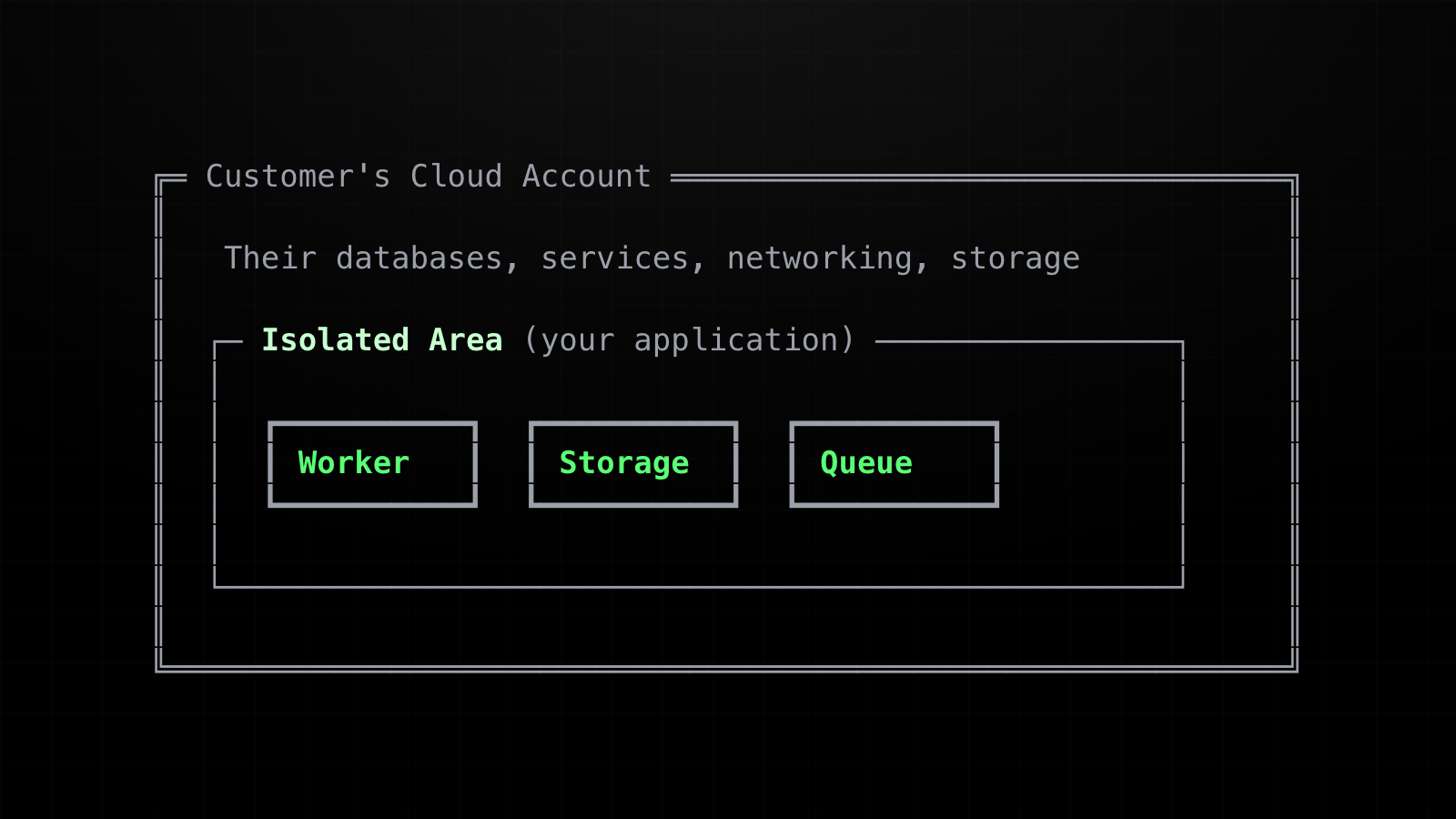
The exact boundary depends on the platform:
- Azure: a resource group
- GCP: a dedicated project
- AWS: a set of resources that share a naming prefix, like
acme-*
How Alien reaches that isolated area depends on what the customer's security team allows.
When they allow it, Alien uses push mode: the customer grants narrowly scoped access — on AWS, for example, a cross-account IAM role — and the Deployment Manager, Alien's control plane running in your own cloud, manages the deployment directly through cloud provider APIs.
Many enterprises won't allow that. They only permit outbound HTTPS, and on-prem there is no notion of cross-account access at all.
For those cases, Alien uses pull mode: a lightweight operator container runs inside the isolated area. It connects outbound to the Deployment Manager, fetches releases, deploys them locally, sends telemetry, and fetches commands.
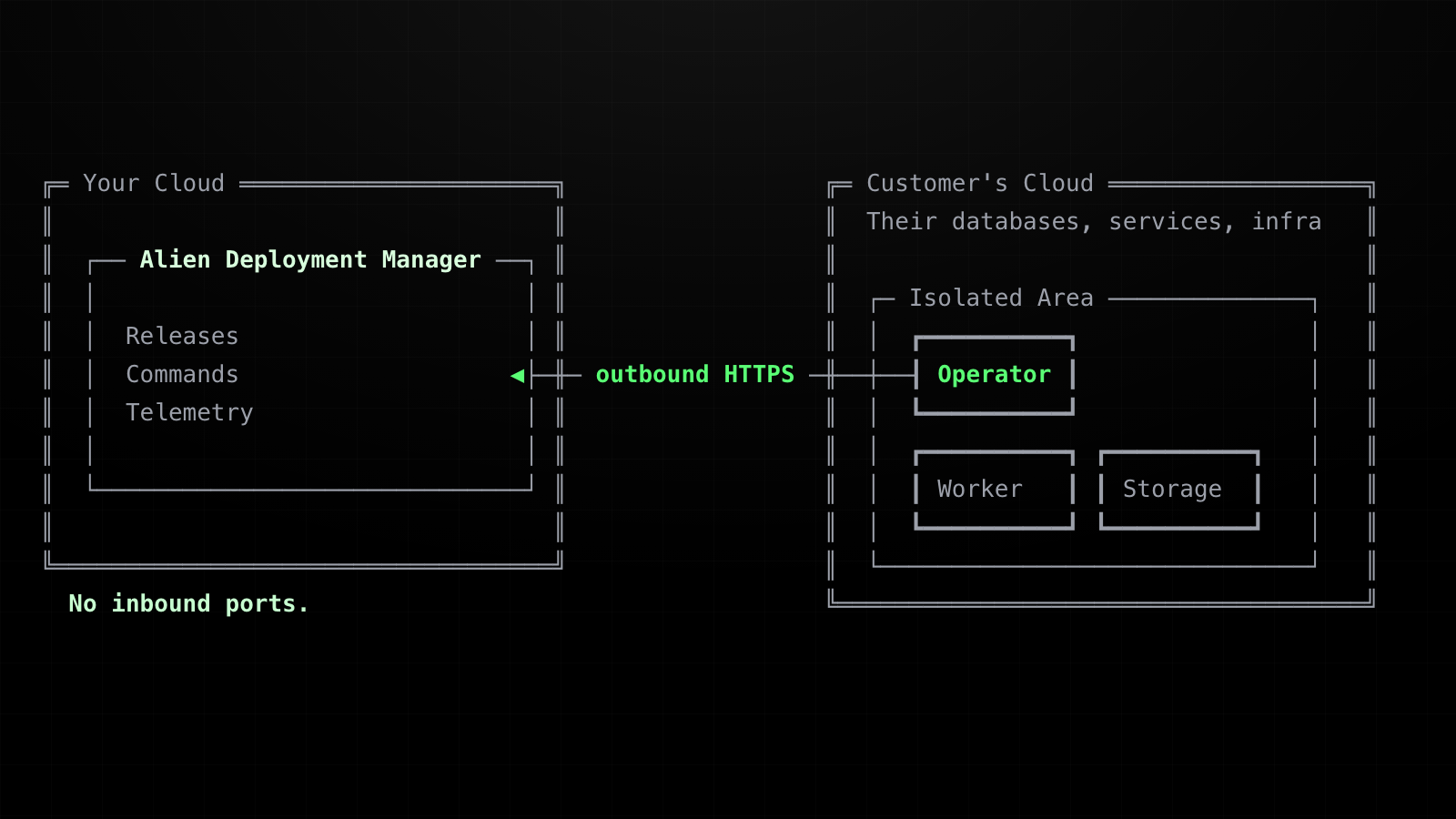
This puts a lot of responsibility on the operator.
In pull mode, Alien never reaches into the customer's environment from the outside. Every update flows through the operator running inside the isolated area. It is the only component with the local permissions, network access, and context to apply a release and report back.
So it has to keep working through ordinary failure: process restarts, network loss, delayed approvals, telemetry backpressure, and deployments that are only half applied.
When it can't, you hit one of the worst failures in BYOC: losing the ability to manage a running deployment. The software keeps serving traffic inside the customer's environment, but you can no longer update, recover, or even inspect it, and you are back to manual customer-admin operations.
#From JSON State To Turso
We like simple solutions, so the first version was simple.
The operator already had one important object to remember: the deployment state.
A deployment state is the operator’s local view of what is running, what should be running next, and what resources already exist in the customer environment. It includes the current release, the target release, the platform, the stack state, and enough metadata for the deployment loop to continue safely.
A simplified version looks like this:
{
  "status": "provisioning",
  "platform": "aws",
  "currentRelease": {
    "releaseId": "rel_2026_06_01",
    "version": "1.4.2"
  },
  "targetRelease": {
    "releaseId": "rel_2026_06_18",
    "version": "1.5.0"
  },
  "stackState": {
    "platform": "aws",
    "resourcePrefix": "acme-prod",
    "resources": {
      "api": {
        "type": "container",
        "status": "updating",
        "outputs": {
          "url": "https://api.acme.example"
        }
      },
      "data": {
        "type": "storage",
        "status": "running",
        "outputs": {
          "bucket": "acme-prod-data"
        }
      },
      "cache": {
        "type": "kv",
        "status": "running"
      }

      // ...
    }
  },
  "runtimeMetadata": {
    "preparedStack": {
      // stack after deployment-time mutations
    }
  },
  "protocolVersion": 1
}
Initially, storing this as JSON on disk was reasonable.
await writeFile(
  "deployment-state.json",
  JSON.stringify(deploymentState, null, 2)
)
It was local. It was easy to inspect. It did not add any new infrastructure.
But the operator quickly became responsible for more than one JSON document.
You could split that into multiple JSON files:
deployment-state.json
deployment-config.json
approvals.json
telemetry.jsonl
commands.json
schema-version
That helps organization, but not reliability.
Now you have to coordinate writes across files. A release update might need to change deployment state and deployment config together. A telemetry upload might need to delete some records while another loop is appending new ones. A schema migration might need to touch every file and either complete fully or not run at all.
Multiple JSON files turn one fragile file into a small file-based database — and the operator's workflows pull in different directions.
The operator has to sync desired releases from the Deployment Manager, apply deployments step by step, persist approval decisions, buffer telemetry while offline, and keep enough local context to deliver commands. Those workflows have different lifecycles: deployment state is overwritten as a deployment progresses, approvals are created and then kept for audit, and telemetry is appended in batches, then deleted only after the Deployment Manager accepts it.
You can patch the file approach for a while:
await writeFile("deployment-state.json.tmp", JSON.stringify(deploymentState))
await rename("deployment-state.json.tmp", "deployment-state.json")
That makes a single write safer. It does not give you a good model for many records, multiple independent loops, partial deletes, schema migrations, indexes, or transactional updates.
Telemetry, for example, wants database-shaped operations:
SELECT id, type, data
FROM telemetry
ORDER BY created_at
LIMIT 100;
Then, after a successful upload:
DELETE FROM telemetry
WHERE id IN (?, ?, ?);
The more reliable the operator needed to become, the more these JSON files turned into a database implemented badly. At that point it is better to use an actual embedded database.
So we made it explicit.
#Remote Commands Make The Database Sensitive
Deployments keep the customer's software up to date. Remote Commands are how your control plane talks to that software once it is running: your backend, CLI, dashboard, or AI agent invokes a handler defined in your application code, the handler runs inside the customer environment, and the result comes back. No inbound ports, no VPN.
For example, a data product might expose a command that queries a database behind the customer's firewall:
import { command, vault } from "@alienplatform/sdk"
import { Pool } from "pg"

const creds = vault("credentials")

command("get-users", async ({ status, limit }) => {
  const config = JSON.parse(await creds.getSecret("warehouse"))
  const pool = new Pool(config)

  const { rows } = await pool.query(
    "SELECT id, name, email FROM users WHERE status = $1 LIMIT $2",
    [status, limit ?? 100]
  )

  return { rows, count: rows.length }
})
The warehouse credentials stay in the customer’s vault. The database stays private. Only the command result comes back.
In push mode, the Deployment Manager dispatches commands directly through the cloud provider — Lambda invoke, Pub/Sub, Service Bus. In pull mode it can't reach the runtime directly, so the operator fetches pending command work over outbound HTTPS, uses local deployment state to find the right runtime, and dispatches the command inside the isolated area:
let deployment_id = db.get_deployment_id().await?;
let commands_url = db.get_commands_url().await?;
let deployment_state = db.get_deployment_state().await?;

let target = find_command_target(&deployment_state)?;
let leases = fetch_command_leases(commands_url, deployment_id).await?;

for lease in leases {
    dispatch_to_local_runtime(target, lease).await?;
}
That puts the local database directly on the command path. It holds deployment configuration, stack outputs, command routing context, approval snapshots, and buffered telemetry — and command payloads and responses can carry diagnostic output, runtime metadata, or customer-specific identifiers.
We did not want that sitting in plaintext on disk. The operator needed embedded storage and encryption at rest.
#Why Turso
Turso gave us the properties we needed in one local dependency:
- embedded database
- Rust API
- file-backed durability
- SQL instead of hand-rolled file coordination
- encryption at rest
- no extra database service for the customer to run
Alien’s infrastructure is written in Rust, so Turso fit naturally into the operator. We did not need to wrap a separate database process, shell out to a CLI, or introduce another runtime dependency.
The operator opens an encrypted local Turso database from its data directory:
let db = turso::Builder::new_local(path)
    .experimental_encryption(true)
    .with_encryption(turso::EncryptionOpts {
        cipher: "aegis256".to_string(),
        hexkey: encryption_key.to_string(),
    })
    .build()
    .await?;
The encryption key is required and validated before startup. If the key is invalid, the operator fails early instead of silently creating unusable local state.
The schema is intentionally small — a key/value state table, an approvals table, and a telemetry buffer. That is enough for the operator to keep deployment progress, approval state, telemetry buffering, and command-routing context durable across restarts.
#What Turso Does Inside The Operator
The operator has several loops running at the same time.
The sync loop talks to the Deployment Manager and writes the desired release and deployment configuration locally.
db.set_deployment_state(&deployment_state).await?;
db.set_deployment_config(&deployment_config).await?;
The deployment loop reads that state, applies the deployment step by step, and persists progress after meaningful changes.
let mut state = db.get_deployment_state().await?;
let config = db.get_deployment_config().await?;

let next = run_deployment_step(state, config).await?;
db.set_deployment_state(&next).await?;
The telemetry loop accepts OTLP payloads locally, forwards them to the Deployment Manager, and deletes only the records that were accepted.
let pending = db.get_pending_telemetry(100).await?;

for item in pending {
    if manager.accepted(item).await? {
        db.delete_telemetry(&[item.id]).await?;
    }
}
The commands loop uses local deployment state to dispatch command work into the customer environment.
Turso is the durable coordination point between those loops.
Without it, the operator would be coordinating through memory and hand-written files. With it, the operator has a small encrypted database that survives restarts and gives each loop a clear place to read and write local state.
#Why This Matters
BYOC lives or dies on one thing: staying manageable after the software enters an environment you don't control. The moment the operator loses track of what it was doing, you're back to screenshots, copied logs, and asking a customer's admin to run things for you — and that's exactly when BYOC stops feeling managed.
So the operator can't be the fragile part. It needs database guarantees — atomic writes, crash recovery, encryption at rest — in the one place where running an actual database is a liability rather than a feature. Inside the customer's environment, every extra service is one more thing for them to approve, patch, and keep alive.
That gap is what Turso closed for us. An embedded, encrypted, file-backed database gives the operator the durability of a real database with the footprint of a file: no sidecar, no extra container, nothing new for the customer to operate.
That's the tradeoff we wanted: the customer's environment stays simple, and the operator just keeps working — even somewhere we don't control.