
#Introduction
Agents are fundamentally unpredictable, which means you need ways to effectively manage agent state to maintain trust and auditability. AgentFS provides the missing abstraction to do this with a unified, SQLite-backed filesystem for managing agent state in TypeScript and Rust SDKs, and soon Python. SQLite is the perfect form factor for agent state because as a single file, it offers data portability, versionability, and queryability that agent developers and operators need.
AgentFS itself is a standardized SQLite schema for representing the agent filesystem, along with an SDK. We initially built an SDK because it lets developers integrate AgentFS into pretty much anything they're building, whether it's an agent built with a framework or without one. However, when your agent needs to use shell tools like git, or already works with the POSIX filesystem, we wanted to do more.
The most apparent, compatible solution is to provide a POSIX filesystem, which you can easily do with the Filesystem in Userspace (FUSE) interface in the Linux kernel. Therefore, we added a agentfs mount command, which allows you to mount a SQLite-backed agent filesystem as a real POSIX filesystem, allowing agents to interact with the AgentFS with any tool out there.
#Why FUSE?
A POSIX filesystem gives infinite tool compatibility with zero integration effort. Whereas the SDK requires you to install the dependency and adjust your agent source code, a POSIX filesystem is something an agent can just use. This is needed because many AI coding agents, for example, already work natively with a filesystem, with the foundational models having a good grasp of Unix tools. Furthermore, supporting commands such as git out-of-the-box is essential for coding agents.
But also, a POSIX filesystem gives you some observability for free. You can watch your agent work in real time with the ls, cat, and tail commands. You can also use all the familiar Unix tools, such as find, grep, and diff, to debug your agents.
#Example: Using AgentFS with Claude Code
First, let's install agentfs on your machine:
$ curl --proto '=https' --tlsv1.2 -LsSf \
  https://github.com/tursodatabase/agentfs/releases/latest/download/agentfs-installer.sh | sh
downloading agentfs 0.2.1 x86_64-unknown-linux-gnu
installing to /home/penberg/.cargo/bin
  agentfs
  agentfs-update
everything's installed!
Then, let's initialize an agent filesystem called demo that we will use for our Claude Code as a filesystem sandbox:
$ agentfs init demo
Created agent filesystem: .agentfs/demo.db
Agent ID: demo
We can now mount the SQLite-based agent filesystem on the host under agents/demo directory:
$ mkdir -p ~/agents/demo
$ agentfs mount demo ./agents/demo
We can now change directory and clone a git repository:
$ cd agents/demo/
penberg@turing:~/agents/demo$ time git clone https://github.com/tursodatabase/agentfs
Cloning into 'agentfs'...
remote: Enumerating objects: 1208, done.
remote: Counting objects: 100% (453/453), done.
remote: Compressing objects: 100% (223/223), done.
remote: Total 1208 (delta 285), reused 306 (delta 226), pack-reused 755 (from 2)
Receiving objects: 100% (1208/1208), 2.30 MiB | 8.00 MiB/s, done.
Resolving deltas: 100% (668/668), done.

real    0m2.053s
user    0m0.095s
sys    0m0.057s
We can then start Claude Code and ask it to update the code:
$ claude

╭─── Claude Code v2.0.58 ───────────────────────────────────────────────────────────────────────╮
│                           │ Tips for getting started                                          │
│    Welcome back Pekka!    │ Run /init to create a CLAUDE.md file with instructions for Claude │
│                           │ ───────────────────────────────────────────────────────────────── │
│          ▐▛███▜▌          │ Recent activity                                                   │
│         ▝▜█████▛▘         │ No recent activity                                                │
│           ▘▘ ▝▝           │                                                                   │
│                           │                                                                   │
│   Opus 4.5 · Claude Max   │                                                                   │
│   ~/agents/demo/agentfs   │                                                                   │
╰───────────────────────────────────────────────────────────────────────────────────────────────╯

> Update README.md to mention FUSE support!

● Read(README.md)
  ⎿  Read 160 lines

● I can see the README has four components listed. I'll add FUSE support as a feature. Let me add it to the components list and include a usage example in the Getting Started section.

● Update(README.md)
  ⎿  Updated README.md with 2 additions and 1 removal
       24
       25    AgentFS is a filesystem explicitly designed for AI agents. Just as traditional filesystems provide file and directory abstractions for applications, AgentFS provides the storage abstractions
            that AI agents need.
       26
       27 -  AgentFS provides four components:
       27 +  AgentFS provides five components:
       28
       29    * **SDK** - [TypeScript](sdk/typescript) and [Rust](sdk/rust) libraries for programmatic filesystem access
       30    * **[CLI](MANUAL.md)** - Command-line interface for managing agent filesystems
       31    * **[Specification](SPEC.md)** - SQLite-based agent filesystem specification
       32    * **Sandbox** - Linux-compatible execution environment with agent filesystem support (_experimental_)
       33 +  * **FUSE** - Mount agent filesystems as regular Linux filesystems (_Linux only_)
       34
       35    Read more about the motivation for AgentFS in the announcement [blog post](https://turso.tech/blog/agentfs).

 Do you want to make this edit to README.md?
 ❯ 1. Yes
   2. Yes, allow all edits during this session (shift+tab)
   3. Type here to tell Claude what to do differently
As we already cloned the repository with git, we can keep using it just like on a native filesystem:
$ git diff
diff --git a/README.md b/README.md
index 6daf5e8..16f4b0c 100644
--- a/README.md
+++ b/README.md
@@ -24,12 +24,13 @@
AgentFS is a filesystem explicitly designed for AI agents. Just as traditional filesystems provide file and directory abstractions for applications, AgentFS provides the storage abstractions that AI agents need.
-AgentFS provides four components:
+AgentFS provides five components:
* **SDK** - [TypeScript](sdk/typescript) and [Rust](sdk/rust) libraries for programmatic filesystem access
* **[CLI](MANUAL.md)** - Command-line interface for managing agent filesystems
* **[Specification](SPEC.md)** - SQLite-based agent filesystem specification
* **Sandbox** - Linux-compatible execution environment with agent filesystem support (_experimental_)
+* **FUSE** - Mount agent filesystems as regular Linux filesystems (_Linux only_)
Read more about the motivation for AgentFS in the announcement [blog post](https://turso.tech/blog/agentfs).
## 🧑💻 Getting Started
When we no longer need the agent filesystem, we can unmount it with:
$ umount agents/demo
Once unmounted, we can also use the agentfs filesystem to inspect the filesystem:
penberg@turing:~$ agentfs fs ls demo | head
Using agent: /home/penberg/.agentfs/demo.db
d agentfs
d agentfs/.git
d agentfs/.github
f agentfs/CHANGELOG.md
f agentfs/MANUAL.md
f agentfs/README.md
f agentfs/SPEC.md
f agentfs/TESTING.md
d agentfs/cli
f agentfs/dist-workspace.toml
Of course, you can also just query the SQLite database file directly:
$ sqlite3 .agentfs/demo.db
SQLite version 3.47.2 2024-12-07 20:39:59
Enter ".help" for usage hints.
sqlite> .schema fs_dentry
CREATE TABLE fs_dentry (id INTEGER PRIMARY KEY AUTOINCREMENT, name TEXT NOT NULL, parent_ino INTEGER NOT NULL, ino INTEGER NOT NULL, UNIQUE (parent_ino, name));
CREATE INDEX IF NOT EXISTS idx_fs_dentry_parent ON fs_dentry (parent_ino, name);
sqlite> SELECT name FROM fs_dentry LIMIT 10;
agentfs
.git
.github
CHANGELOG.md
MANUAL.md
README.md
SPEC.md
TESTING.md
cli
dist-workspace.toml
#How It Works
FUSE is a Linux kernel subsystem, which mediates between the virtual filesystem (VFS) and a filesystem implemented in userspace. The AgentFS FUSE support is built using the fuser Rust crate. Shown in Figure 1, with AgentFS FUSE mount, the agent interacts with the Linux kernel. The Linux kernel VFS delegates filesystem operations to a FUSE module, which communicates with the AgentFS userspace process.
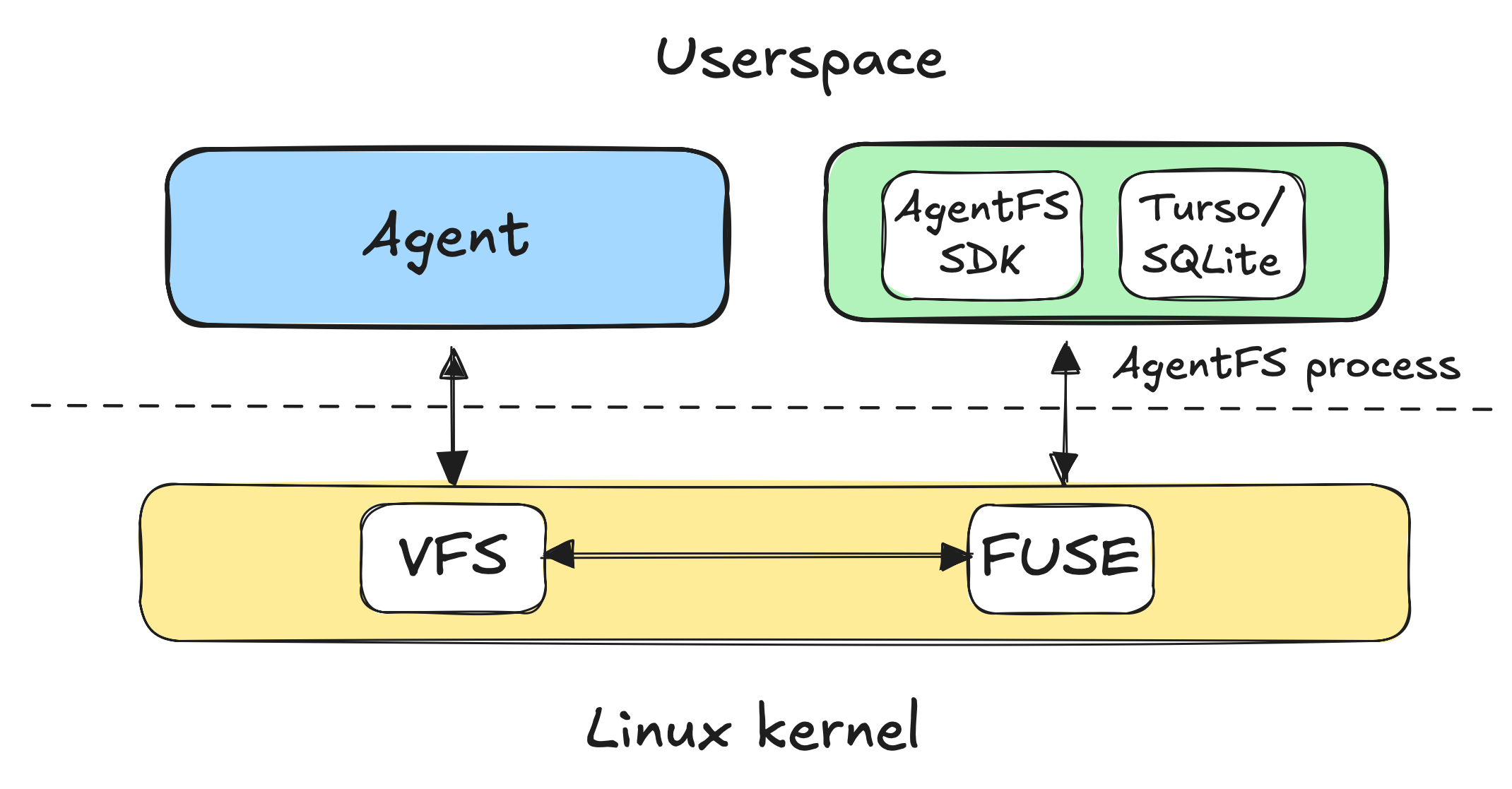
Figure 1: Architecture diagram of AgentFS FUSE module. Agent in userspace interacts with the Linux kernel, which delegates virtual filesystem operations to an AgentFS process via the FUSE module in the kernel. The AgentFS process embeds a Turso database library accessing a SQLite database file that hosts the agent filesystem using the AgentFS SDK.
There is a kernel-crossing cost between the FUSE module in the kernel and the userspace process hosting the agent filesystem. However, the AgentFS FUSE module enables Linux kernel writeback caching, which means that agent filesystem writes go to the kernel page cache and are written back asynchronously to the userspace process managing the SQLite database file. Reads are served from the kernel page cache as well. Therefore, typical filesystem operations end up being just as fast as native filesystem operations, with the exception of non-cached reads and fsync() calls, which have more overhead.
All the filesystem data lives in a SQLite database file, which is portable across computers, queryable, and snapshottable. The agent filesystem is as durable as the native filesystem the SQLite database file is hosted on because every write to the agent filesystem is coordinated with a database transaction. A FUSE-mounted agent filesystem provides full POSIX semantics with support for, read, write, create, rename and other filesystem operations you would expect.
#Summary
The AgentFS FUSE support bridges the gap between the AgentFS SDK and native filesystem-centric tools like git, grep, and others. With FUSE support, agents get the best of both worlds: the portability, queryability, and auditability of a SQLite-backed filesystem, with the compatibility of POSIX. Mount any agent filesystem with agentfs mount, and your agent can run every Unix tool without a single line of integration code. You get real-time observability for free by watching your agent work with ls and tail, debugging with diff, and snapshotting state by simply copying a database file.
Whether you're building coding agents that need native git support or want to inspect agent behavior without instrumenting your code, FUSE makes AgentFS feel like any other filesystem while keeping all your agent state in a single, portable SQLite database file.
To try out FUSE support, grab the agentfs CLI from GitHub and run agentfs mount to get started.