Turso Cloud BYOC: the same product, in your own AWS account
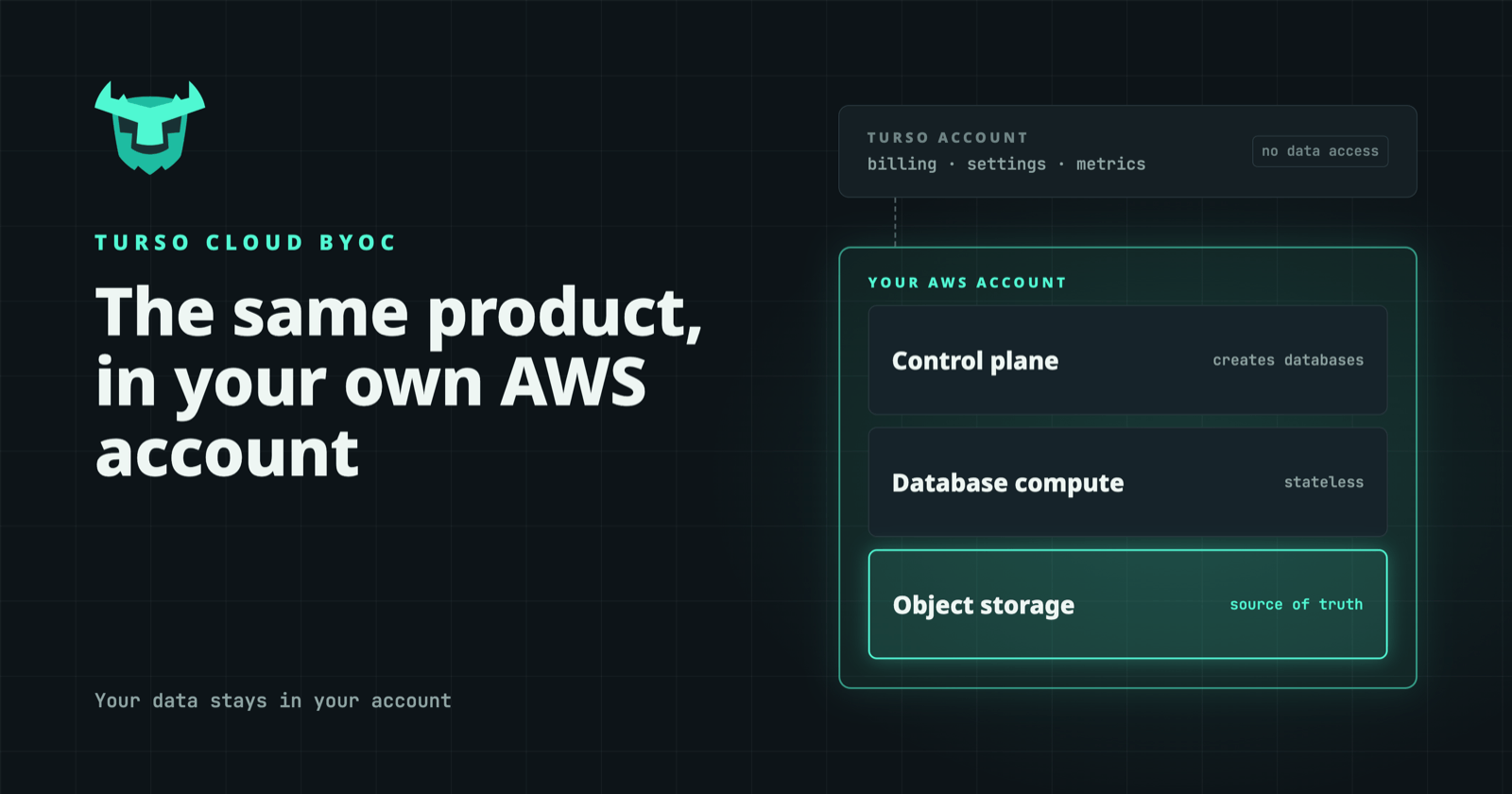
Turso Cloud BYOC runs Turso Cloud inside your own AWS account. It is the same product, with the same API and the same operations, and your data stays in your account.

Agents create data all the time. A coding agent may open a new workspace for every task, and an app builder may generate a fresh schema for every project a user starts. The pattern that fits these workloads is one database per agent, user, or tenant. Turso Cloud was built to run that pattern at the scale of millions of databases.
For teams building agent platforms, one question often decides whether they can use a managed database at all: where does the data live? Their customers' data and agent state often can't sit in a vendor's cloud account. The usual alternative is to self-host and take on all the operations.
Turso Cloud BYOC (Bring Your Own Cloud) runs Turso Cloud inside your own AWS account. It is the same product, with the same API and the same operations. Your data stays in your account, and Turso has no access to it.
BYOC as a deployment model is common, and many database vendors offer a version of it. What Turso adds is the workload it was designed for. Agent platforms create and discard huge numbers of small databases, and many of them share no schema, because each agent or user defines its own. Turso Cloud handles that natively, and BYOC brings the same capability into your environment.
#What BYOC means in practice
Turso Cloud BYOC is a deployment of Turso Cloud in an AWS account you own. If your infrastructure runs on GCP, talk to us about your deployment. In day-to-day terms:
- Your infrastructure. Database compute and storage run in your account, in the regions you choose.
- Your contract. Usage runs under your existing agreement with AWS, so procurement doesn't need a new infrastructure vendor.
- Your infrastructure costs. Compute and storage appear on your own cloud bill.
- Managed operations. Database creation and management follow the same workflows as Turso Cloud, so your team doesn't build or operate its own database platform.
Turso can offer this because of how Turso Cloud stores data. In 2025, Turso Cloud moved to a diskless architecture: data lives in object storage, and local disks act only as a cache. Database compute nodes carry no local state, so they can be replaced or moved without migrating data. That makes deployment into a customer's account something Turso can automate, instead of a hand-managed cluster of stateful services.
#Architecture: what runs where
Turso Cloud BYOC splits Turso Cloud across two accounts, and almost everything lands in yours.
The data plane always runs in your account. That includes the compute nodes that run your databases and the object storage that holds their data.
The control plane is federated. The part that creates and manages databases runs in your account, so every database operation happens there. The part in Turso's account holds only billing, organization settings, and metrics.
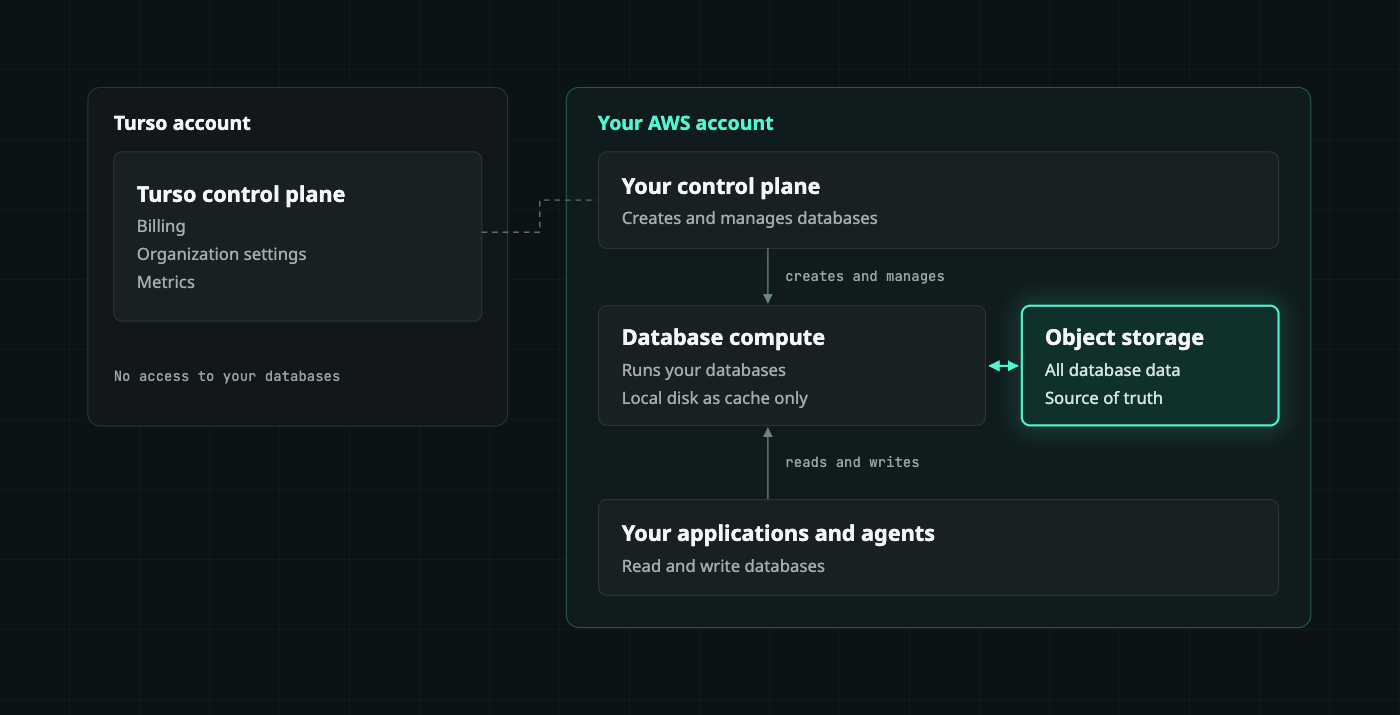
The dashed line is the federated control plane: Turso's side never touches databases or data.
From your Turso organization's point of view, a BYOC deployment works like another Turso Cloud region. You create databases in it the same way you would in any other region, and they run on infrastructure you own.
#What you control
With BYOC, the security model of your databases is the security model of your cloud account. Network rules and access policies follow the controls you already apply to the rest of your infrastructure, and databases run only in the regions you deploy to, so data residency stays in your hands.
Database contents never leave your account, and Turso has no ability to create, delete, or inspect your databases. For a security review, the answer to "what can the vendor see?" is short: the account-level data described above, and nothing inside your databases.
#What stays the same
Some vendors ship a separate product for self-hosted deployments, and over time its features and release schedule fall behind the managed service. Turso Cloud BYOC runs the same software as Turso Cloud. The only difference is who owns the infrastructure.
In practice, that means your application code doesn't change. You use the same SDKs, the same Platform API to create databases on demand, and the same databases: Turso, an open-source, SQLite-compatible database written in Rust. The many-database model works the same way, so an agent platform can still create a database per agent or per user and discard it when the session ends.
The Turso Cloud features you build on carry over to BYOC, including:
- Concurrent writes. Turso's MVCC lets multiple connections write to the same database at once, instead of waiting on SQLite's single writer.
- Bring-your-own-key encryption. Each database can be encrypted with its own key, which stays opaque to Turso.
- Point-in-time restore. Continuous backups let you roll a database back to before an agent or a person made a mistake.
- Turso Sync. Databases can sync between your BYOC deployment and local copies on devices or servers.
It also means you can start on Turso Cloud and move to BYOC later, or run both. A team can prototype in the managed cloud, then deploy to its own account when a customer requires it, without rewriting anything.
#BYOC vs. on-prem
BYOC and on-prem often get grouped together, but they describe different environments. BYOC means Turso Cloud runs in your account with a public cloud provider. On-prem means it runs on hardware in your own data center.
Turso Cloud BYOC targets the first case. Its storage layer depends on object storage and on infrastructure that behaves like a public cloud, which is what makes the diskless architecture possible.
A data center deployment is possible in principle, but only with S3-compatible object storage and an environment that behaves like AWS. If your requirement is strictly on-prem, talk to us about your setup before planning around it. If you want an embedded database on your own servers or devices, the open-source Turso Database runs anywhere, without the Turso Cloud layer.
#Where BYOC fits
Turso Cloud BYOC is the answer when two needs meet. The first is that data must stay in your AWS account, or in your customer's. The second is that you need a database per agent, user, tenant, or device.
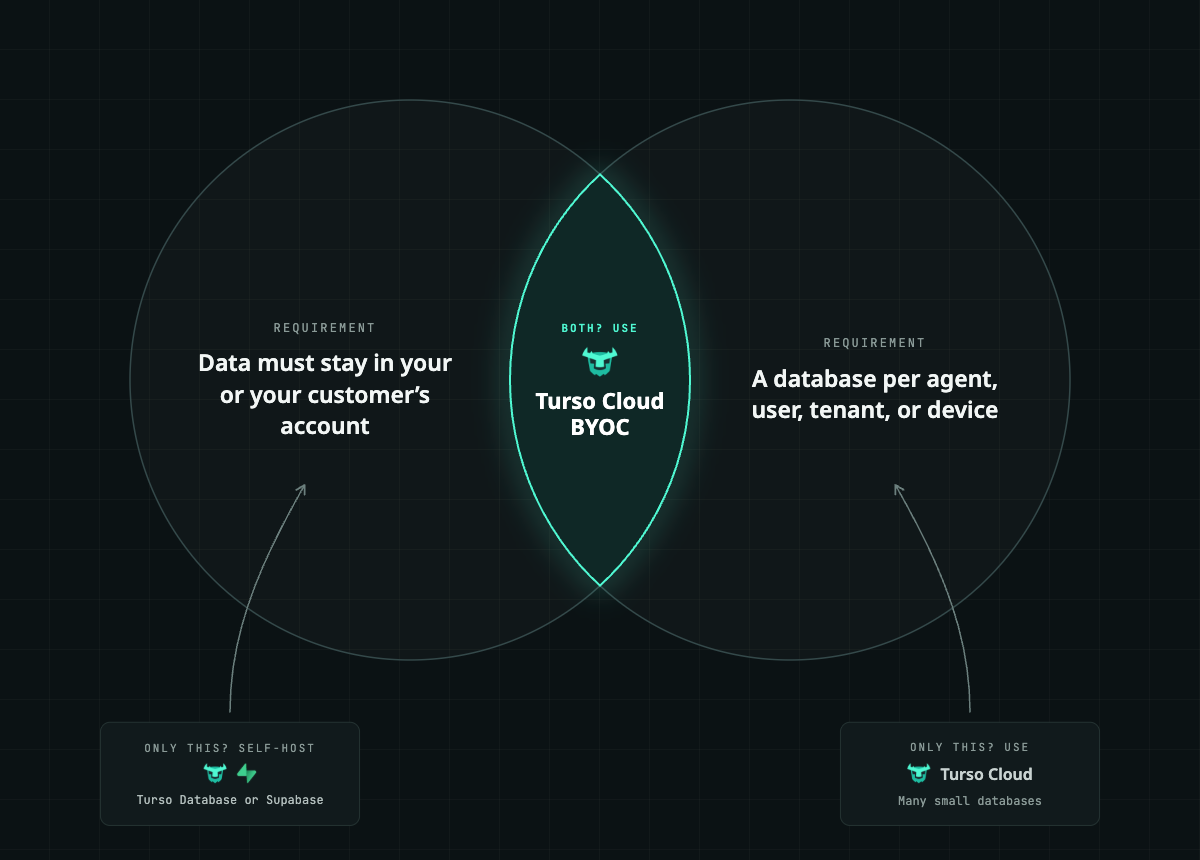
Each need on its own has a simpler answer. If you only need to keep one or a few large databases in-house, a self-managed database does the job. If you need many small databases and they can live with a vendor, hosted Turso Cloud gives you that with nothing to deploy. BYOC is for teams that need both at once, and that happens in four common situations.
#Agent platforms at scale
Labs, sandbox vendors, coding-agent companies, and assistant products create databases in huge numbers. Many choose to keep them in their own AWS account, next to their compute and under their own security controls. Two kinds of platform stand out.
AI apps, sandboxes, and vibe-coding platforms create a database per generated app or per evaluation run. Shared databases leak data between apps and are hard to clean up, and a Postgres instance per app costs too much when most of them sit idle. With Turso, each app or run gets its own database, created on demand and deleted when it's done. Idle databases cost little, because each one is a file in object storage, not a running server. Branching lets an agent fork a known state, try an approach, and roll back if it fails.
Personal and AI assistants keep a memory database per user. When memory lives in a shared store, deleting or auditing one user is painful. With a database per user, deleting a user means dropping one database, and vector search inside each database lets the assistant recall by meaning.
#SaaS and platforms with enterprise customers
Many SaaS products already isolate customers with a database per tenant. Most customers are fine with a hosted service. Enterprise customers often aren't: they want their data in their own cloud, and building a separate deployment for them takes quarters.
With Turso, smaller customers run on hosted Turso Cloud and enterprise customers get the same design in their own AWS account, so one architecture serves both tiers. This applies to any multi-tenant product, including software vendors adding agents to their products and platforms where customers build and run agents.
#Regulated and sovereign workloads
In healthcare, finance, insurance, and legal work, security reviews stall when the data layer sits outside the customer's boundary. In-country deployments add a further requirement: data has to stay in a specific jurisdiction.
BYOC keeps databases in your AWS account, in the regions your rules require, and Turso can't access them. A database per client or patient limits who can see what, and makes deletion and export simple. Enterprises running internal agent platforms use the same pattern, with a database per agent inside their own network. Your team gets the many-database model without building its own database platform.
#Device fleets
Vehicles, handhelds, and devices in the field lose signal, but work has to continue. Fleets need local speed on each device and a fleet-wide view in the cloud, without stitching two different databases together.
Turso runs on the device as an embedded database and syncs with a database per device in your AWS account when the connection returns. The same engine runs in both places, so the same queries work on the device and in the cloud. Offline sync is in beta, and it isn't meant for safety-critical control paths.
#Get started
If you're evaluating where your agents' data should live, contact our team to talk through a BYOC deployment in your AWS account. To see how Turso Cloud works first, including creating a database per user or agent, try Turso Cloud free.