One Postgres, a database per user, or both?
Wojciech Adamek, CTO of Feathered, explains how he decides between one Supabase Postgres database, a Turso database per user, or both, and where he draws the line between them.

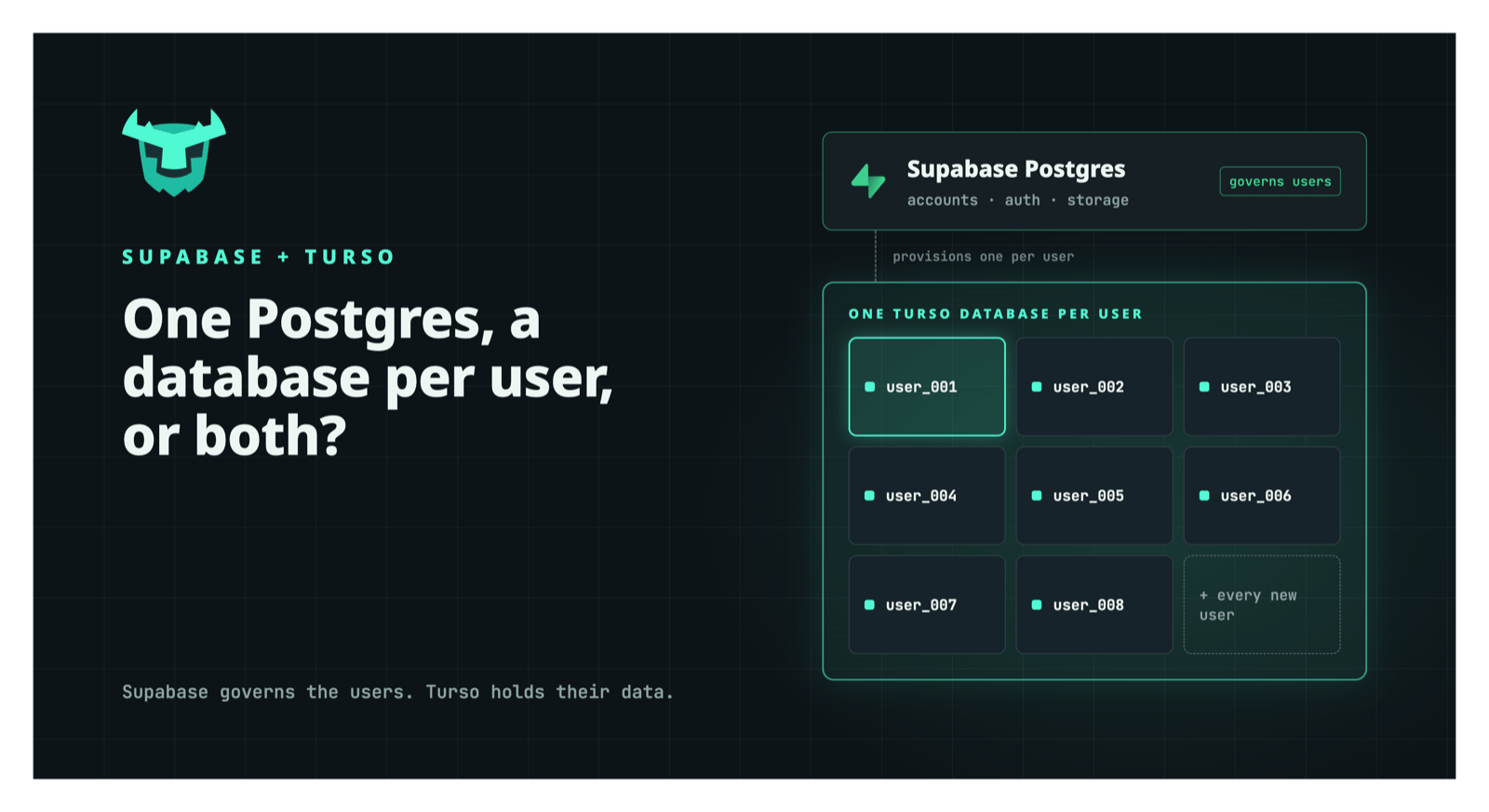
Should an app run on one Postgres database, on many lightweight Turso databases, or on both? Most teams I talk to face some version of that question, and there's rarely one right answer. It depends on where the data lives, who it belongs to, and how much the product is likely to change.
Wojciech Adamek has made that call many times. Over ten years as a CTO or tech lead, Wojciech has worked with more than 15 startups. Today he's founder and CTO of Feathered, a senior studio in Poland that acts as fractional CTO and build team for founders who know their field but don't come from engineering. Across client web apps, desktop apps, and AI tools, he's landed on different answers: a single Supabase Postgres database for most client products, and Supabase plus a Turso database per user for Feathered's own products, such as Sample Vault and its internal tools.
Since October, Turso is part of Supabase, so a single Postgres database, many Turso databases, and the combination of the two now come from one company. That makes the guidelines he uses to choose between them useful for any team facing the same decision.
#The questions that decide it
Wojciech works through the same questions every time, whether the product is a client's web app or his own:
- What kind of database does the product need? Relational, document-based, built for mobile, or embedded inside the app.
- Where does the data have to live? On a server reached through a browser, or on each user's machine, available offline.
- Who does the data belong to? If most features work on one user's data, a database per user fits. If many need to read across users, a shared database fits better.
- What happens if the needs change? Early products pivot, so every recommendation comes with a way out.
An early-stage web app usually starts on one Postgres database, because a second one adds code and failure points before the product needs them. A local-first app gives each user their own database, because that user's data has to live on their machine. Some products need both, with a clear line between what Supabase governs and what each Turso database holds.
#Early-stage web apps: one Postgres database and a way out
Most of Feathered's clients are experts in their own field, not engineers, so Wojciech starts the database conversation below any product name. First he settles what kind of database the product needs: document-based like MongoDB, relational like Postgres, something built for mobile like Firebase, or an embedded database that runs inside the app, like Turso.
Then he asks what happens if those needs change. Pre-seed and pre-Series A companies can pivot hard, and a choice that made sense on day one can stop making sense months later.
The question founders ask most is whether it will scale: tens of thousands of users, and how much data each one brings. After that come maturity and vendor lock-in. His answer is to say upfront what will be hard or impossible with the database he recommends, and to describe the way out if the founder's needs change.
A concrete example is the Systellar’s Synapse use case where the team started with a custom authorization setup built on row-level security and moved to Cerbos, a mature authorization tool, once the product’s requirements were clear.
For most early-stage web apps, that conversation ends at Supabase Postgres. Auth, row-level security, and S3-compatible storage come ready, so nobody wires separate services together while speed matters most. And because it's Postgres underneath and can be self-hosted, clients have a way out if they later need an on-premises or multi-instance deployment.
A web app starts to need a database per user when it has to run locally, work across desktop platforms, or integrate heavily with AI agents. Those are the signals that make him recommend a database per user on Turso. From what we see across Turso Cloud, the case gets stronger still when each user or agent defines its own tables, because then there's no shared schema to put everyone's data in.
#Local-first apps: a database per user as an exit strategy
Local-first apps keep each user's data on that user's machine. Wojciech's clearest example is Sample Vault, his own project: an AI-powered sample browser for music producers. He says producers are wary of renting their tools: they've seen prices become unsustainable, products drift away from what they need, and companies shut down and take access with them. So every decision on Sample Vault gets checked against one question: if the product changes course or disappears, does the producer still have their work?
"Local-first is an exit strategy, not an offline feature," is how he puts it. As a founder he understands why businesses like subscriptions, but he believes "products should be owned, not rented," and the database is where that belief either holds or doesn't.
A database per user is how Sample Vault delivers it. Each premium user's library lives in its own Turso database in Turso Cloud, and a full replica of it lives on their machine through Turso Sync. The data they depend on is already on their disk, whether they're offline in a studio or the product is gone.
He got there by elimination. Before Turso, the team tried several other architectures, among them running Postgres inside the app with PGlite. Our Sample Vault case study covers what didn’t work and why. Turso Database, an open-source, SQLite-compatible database written in Rust, gave him a local database that syncs to the cloud, with built-in vector search for the AI features.
The second thing a database per user gives you is isolation by construction. On client projects built on Supabase, Wojciech sets up row-level security from day one. With a database per user, there's no shared table where one user's rows sit next to another's, so the boundary lives in the architecture instead of in a policy someone has to get right.
#Apps that need both: where the line sits
When an app needs both, as Sample Vault and Feathered's internal tools do, Supabase is the master database and Turso holds each user's data. "One governs the other," Wojciech says. Supabase handles what spans users: accounts, authentication, authorization, file storage, and project-level data. Each user's Turso database holds everything that belongs to that user alone.
Supabase stays in these apps for the same reason it's the default for early-stage web apps: auth, row-level security, and S3-compatible storage come ready. A database per user doesn't replace any of that, so Supabase governs the users and Turso holds their data.
The two meet at provisioning. "Whenever a user subscribes to my application, I automatically provision the database for them," Wojciech said when we first wrote about Sample Vault, "and whenever they open the application, they immediately connect with that database specifically." Creating that database and registering it against the user in Postgres is code his team wrote and maintains.
The rule that falls out of his split is simple to state. If data belongs to one user, it goes in that user's Turso database. If it governs users, or something has to read it across users, it goes in Supabase Postgres. That's the pairing we describe for agent platforms too: the app's backend on Supabase, and a Turso database for each agent, user, or tenant.
Agent platforms often add one more requirement: their enterprise customers need the data to stay in their own cloud account. Turso Cloud BYOC runs the same database-per-user model in the customer's AWS or GCP account, so each user or agent still gets its own database, and the data never leaves infrastructure the customer controls.
#AI agent apps: where data has to cross the line
AI agents put the most pressure on that line. One of Feathered's internal tools is a work organizer, a Tauri desktop app built around AI. Each user's lists and tasks live in their own Turso database, local on their machine and synced to Turso Cloud. Day to day, nothing in it needs another user's data.
The interesting part is delegation. A user can hand a task on their list to an AI agent that Feathered hosts. Each agent accepts an HTTP request or webhook that wakes it up to do the work.
That's where the line gets crossed. To wake the right agents, the server has to find every delegated task, across every user, and work out which agent it belongs to. With each user's tasks in a separate database, the only direct route is to query every database one by one.
So the team copies delegated tasks into a master database and governs them there. Wojciech is candid that it's a compromise: "There is a little bit of a breach of what Turso is there to solve, like a separation of concerns and separation of data."
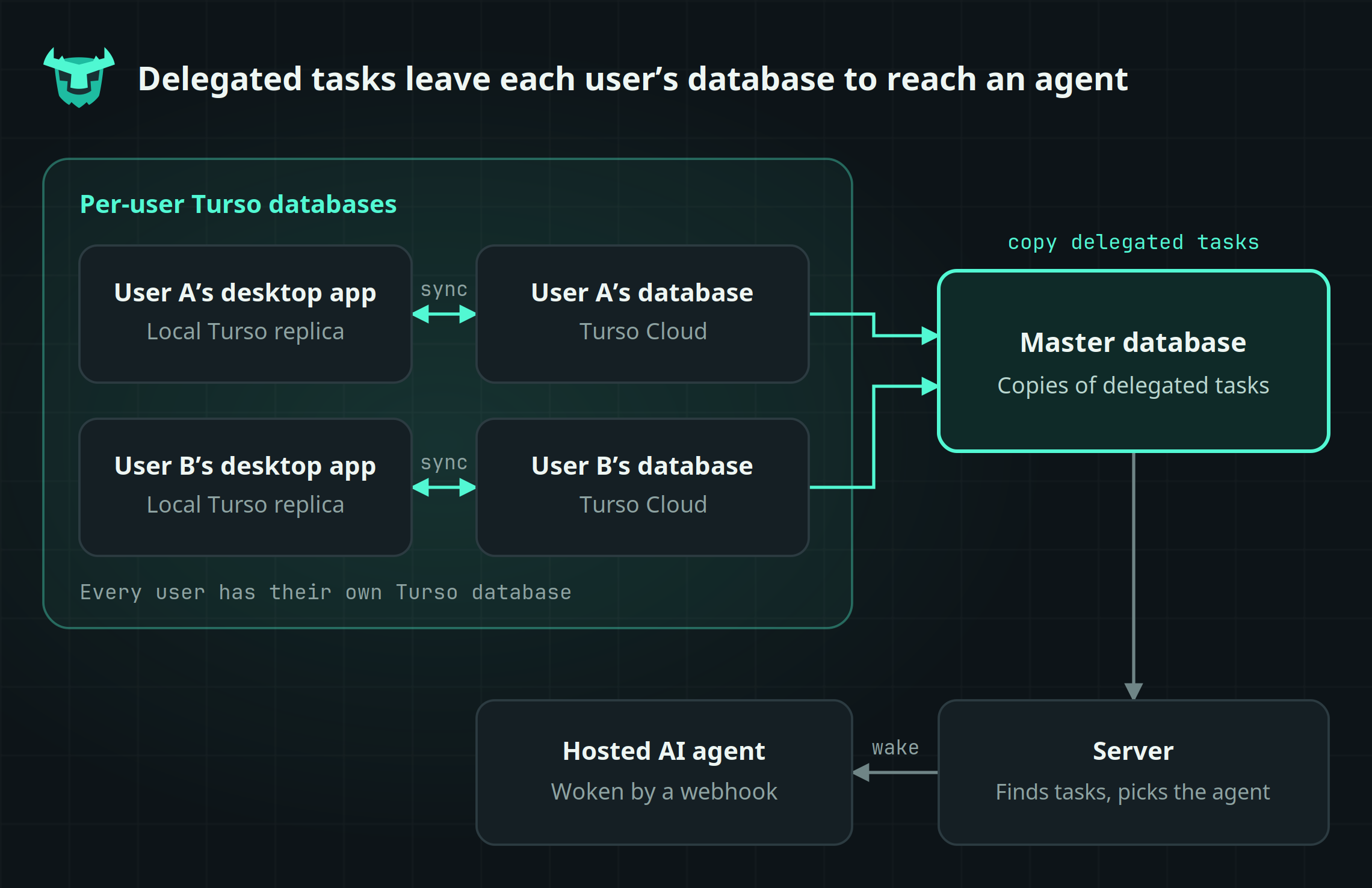
The copy into the master database is the one step where a user's data leaves their own database.
The database-per-agent pattern works best when there is no data sharing between databases. When there is, it becomes a trade-off. Querying all databases can work well if the number of databases is limited and these queries are infrequent. If querying shared data is frequent, consider an ETL job with aggregation into a central database.
#A database per user is a bet against cross-user features
Wojciech's sharpest point is one that not many users often notice: "Database per user is really a bet against cross-user features." Isolating each user's data is the point of the model. When a feature needs to aggregate across users, you either query every database or duplicate data into a central one, as the task app does.
He sees the same property as a strength and a weak spot. By design, the boundary between users can't be crossed, so you can't shoot yourself in the foot. In practice, that boundary is hard to hold, because authentication, authorization, and file storage live in other systems. "Either the entire architecture enforces it, or there's not much upside to it."
Keeping each user's data consistent with the system that governs it is the harder problem. If a user's database and their record in Postgres drift apart, he warns, it can become a nasty problem to untangle. Today his team handles that with its own code, and on Turso alone they'd also be assembling auth and storage from more services. As he put it, that's not the end of the world, but it's more moving parts.
The practical takeaway is to list every feature that will ever need to read across users before choosing a database per user. If that list is long, a shared Supabase Postgres database with row-level security may be the better fit for that data.
This is also why the answer changes with the use case. Sample Vault's core features work on one user's library at a time, so the bet pays off. An early-stage web app rarely knows yet which cross-user features it will need, so Wojciech starts it on one database and moves to a database per user when the signals above show up.
#AI makes boring architecture more valuable
I asked Wojciech whether AI will fragment the database landscape, now that migrating between databases is cheaper. AI is good at preserving existing behavior while moving an application to a new data layer, so a wrong early pick no longer means a painful rewrite. He thinks the effect runs the other way: "AI makes boring architecture more valuable, not less."
Part of his reasoning is that AI knows mature databases best, because it was trained on their documentation and years of material about them. The bigger part is longevity. New databases appear and get abandoned just as fast, and while AI can maintain an abandoned one or rebuild what it did, he calls that "a massive sinkhole of time, money, and other resources" in a market where anyone can build anything. Adding an immature database to an AI-heavy workload, in his view, adds uncertainty and security risk that will backfire.
So he expects most software to settle on a few stable foundations, "or new solutions that iterate upon them like Turso does." That's how we think about Turso too. Turso Database stays open source and SQLite-compatible, Turso Cloud stays the home for SQLite workloads, and Supabase Postgres sits next to it for everything that needs Postgres. For Wojciech, that means one database when a product doesn't need more, a database per user when the data belongs to the user, and a clear line between the two when a product needs both.
#Getting started
Turso Cloud's free plan includes 100 databases, with no credit card needed. Create a database per user or agent through the Platform API, and keep your app's backend on Supabase. If your customers need their data in their own AWS or GCP account, talk to us about Turso Cloud BYOC.